Smooth Spins Deposit Guide — Add Real Money to Your Account Securely

Smooth Spins Casino accepts real money deposits in GBP via Visa, Mastercard, Apple Pay and Google Pay. The minimum deposit is £5, funds arrive instantly in most cases, and the welcome offer activates automatically when you top up £10 or more. This guide walks you through the full process - from opening the cashier to seeing your balance update.

Claim your welcome spins — UK players, 18+ only
Registerwith bonus

Opening the Cashier

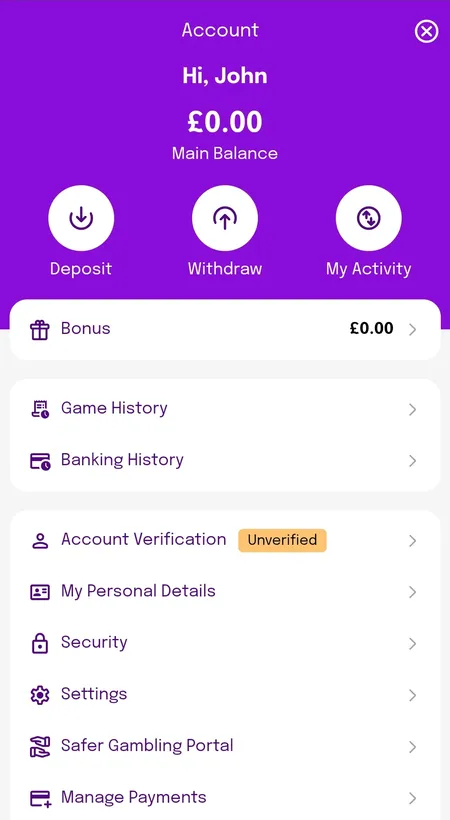
Once you are logged in, tap the green Deposit button in the top right corner of the screen. On mobile, it is also accessible from the account menu. The cashier opens as an overlay - no page reload needed. You will see your current balance, available payment methods and a field to enter the amount.

If you have not yet completed KYC verification, you may see a banner prompting you to verify before your first withdrawal. You can still deposit without full verification, but withdrawals will be held until identity checks are done. It is worth completing verification early to avoid delays later.

Account menu showing main balance and deposit button

The account dashboard shows your Main Balance and Bonus balance separately, with a Deposit shortcut at the top.

Payment Methods and Minimum Deposit

Smooth Spins keeps the cashier simple. Available methods for UK players are:

Method Minimum Deposit Processing Time
Visa Debit £5 Instant
Mastercard Debit £5 Instant
Apple Pay £5 Instant
Google Pay £5 Instant
Bank Transfer £5 Up to 3 working days

Credit cards are not accepted - this applies to all UK-licensed casinos under UKGC rules. Only debit cards qualify.

To activate the welcome bonus (100-200 free spins), you need to deposit and wager a minimum of £10 on any game except blackjack or roulette within 7 days of registration. The £5 minimum is fine for regular play, but will not trigger the welcome offer.

Claim Your Free Spins

Step-by-Step: Making Your First Deposit

Here is exactly what happens when you fund your account:

Deposit Process

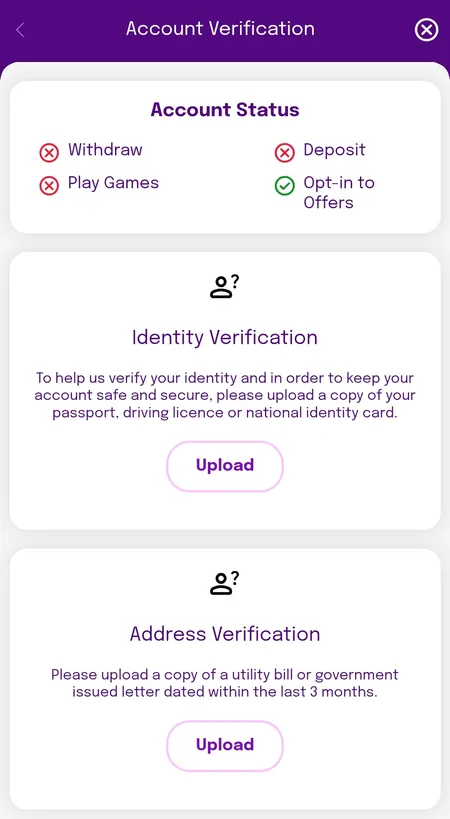
  1. Verification status screen before deposit

    Step 1: Check your account status. If verification is pending, you will see an orange 'Unverified' label. You can deposit, but complete KYC soon to unlock withdrawals.

  2. Cashier method selection screen

    Step 2: Open the cashier and select a payment method. Choose Visa, Mastercard, Apple Pay or Google Pay. All options are displayed as clear tiles.

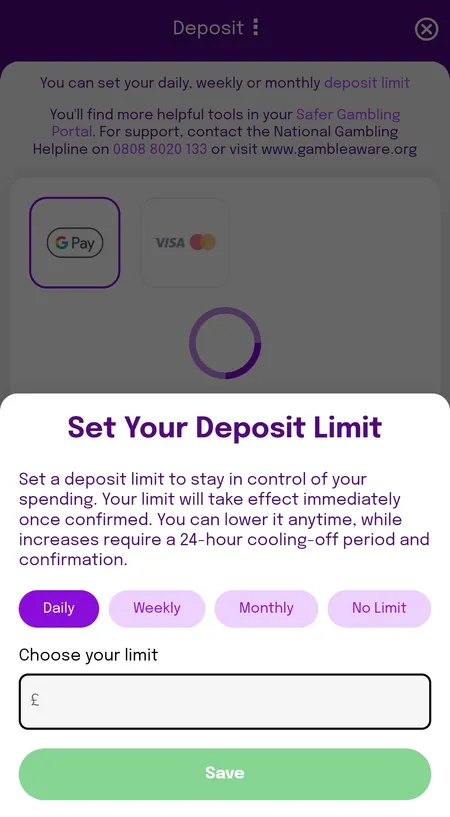
  3. Setting a deposit limit during account setup

    Step 3: Enter your deposit amount and confirm. If this is your first deposit, you may be prompted to set a daily, weekly or monthly limit. This is a UKGC requirement and takes effect immediately.

Verification Before Your First Deposit

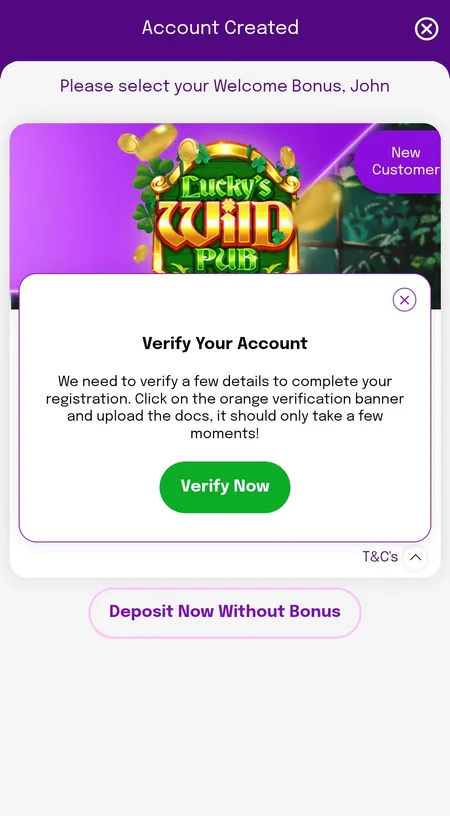
Smooth Spins follows UKGC rules strictly. When you create an account, a Verify Your Account prompt may appear. You are asked to upload:

  • Passport, driving licence or national ID (identity check)
  • Utility bill or bank statement dated within 3 months (address check)

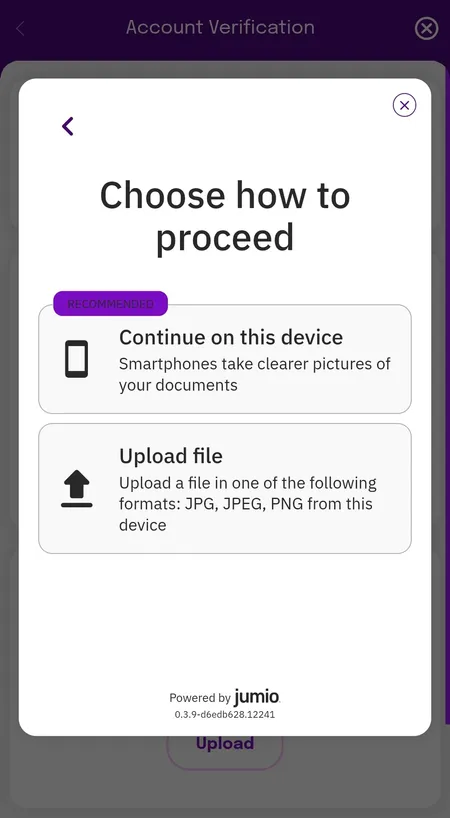
Verification typically completes within 24 hours. Documents are processed via Jumio - you can photograph them on your device or upload JPG/JPEG/PNG files directly. Without completed KYC, withdrawals are not possible, so uploading documents right after registration is the recommended approach.

Jumio verification screen for identity documents

Jumio gives you two options: photograph documents on your current device (recommended) or upload an existing file.

Register and Deposit

How Long Deposits Take

Most deposits at Smooth Spins reach your balance within seconds. Here is a practical breakdown:

  • Visa / Mastercard Debit - instant in nearly all cases
  • Apple Pay / Google Pay - instant
  • Bank Transfer - up to 3 working days

If a card payment is declined, the most common reasons are: insufficient funds, a spending limit set by your bank, or a 3-D Secure authentication step that was not completed. In that case, retry after checking with your bank or use Apple/Google Pay as an alternative. Smooth Spins support is available 24/7 via live chat if the issue persists.

✓

All transactions at Smooth Spins are processed in GBP, so there are no currency conversion fees for UK players. The platform is certified by eCOGRA and uses SSL encryption on every transaction.

Activating Your Welcome Bonus on Deposit

The Smooth Spins welcome bonus is tied directly to your first deposit and wager:

  1. Deposit at least £10 using any accepted method.
  2. Place that £10 as a bet on any game except blackjack or roulette within 7 days.
  3. Free spins (100 to 200 depending on the current offer) are credited automatically.
  4. Free spin winnings are paid as real cash with no wagering requirement in most current offers.

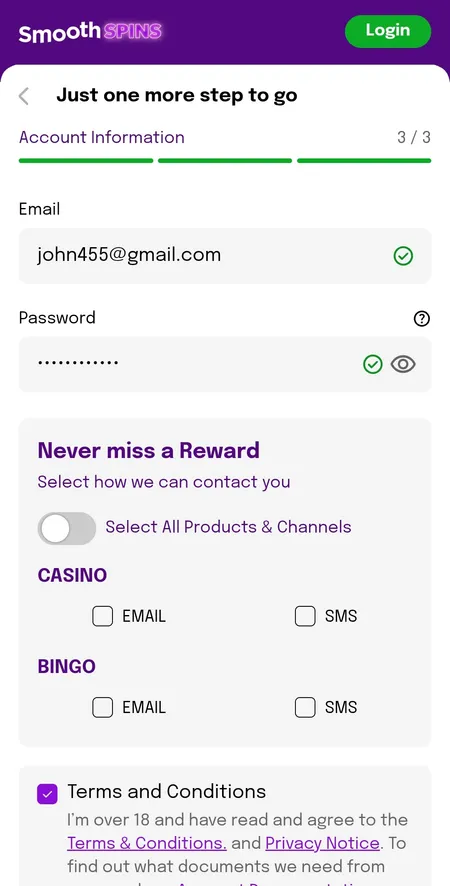
There is no promo code needed. The bonus selection screen appears right after account creation - you can choose the offer or opt to deposit without a bonus. The cashier opens automatically after you select your preference.

If you are considering the welcome offer, check the Smooth Spins home page for the current active promotion, as the specific slot and spin count may vary.

Post-registration screen showing bonus selection and verification prompt

After registration, you choose your welcome offer before depositing. The verify account prompt appears as an overlay at this stage.

Common Deposit Issues

Even straightforward deposits can run into problems. Here are the typical causes and fixes:

Issue Likely Cause Fix
Card declined Bank blocked gambling transactions Call your bank to enable or use Apple/Google Pay
3-D Secure fails Authentication timeout Retry and complete the SMS/app confirmation quickly
Deposit not credited Network delay Wait 5 minutes, then contact live chat
Bonus not activated Wagering condition not met Check that the qualifying bet was not on blackjack or roulette
Limit exceeded Personal deposit limit reached Adjust limits in account settings (increases take 24 hours to apply)

Ready to play? Fund your Smooth Spins account in under two minutes and start with slots, live tables or bingo.

Deposit FAQ

What is the minimum deposit at Smooth Spins?

The minimum deposit is £5 for regular play. To activate the welcome bonus, you need to deposit and wager at least £10 within 7 days of registration.

Can I use a credit card to deposit?

No. Under UK law, credit cards cannot be used for gambling. Smooth Spins accepts only debit cards (Visa and Mastercard), Apple Pay and Google Pay.

How quickly does my deposit appear in my balance?

Debit card and digital wallet deposits (Apple Pay, Google Pay) are credited instantly. Bank transfers can take up to 3 working days.

Is there a deposit fee?

No. Smooth Spins does not charge fees on deposits. Your bank may apply its own charges, but the casino side is free.

Do I need to verify my account before depositing?

You can deposit before completing KYC, but withdrawals are blocked until verification is done. It is better to upload documents early to avoid delays.

Can I set a deposit limit?

Yes. You can set daily, weekly or monthly limits during your first deposit or at any time via account settings. Limit reductions take effect immediately; increases require a 24-hour cooling period.

Will my welcome bonus activate automatically?

Yes, if you have selected the welcome offer during registration and meet the qualifying conditions (deposit and wager £10, excluding blackjack/roulette), the free spins are credited automatically.

What happens if my deposit is declined?

Check that your bank allows gambling transactions. Alternatively, use Apple Pay or Google Pay. If the problem continues, contact Smooth Spins live chat which operates 24/7.

Can I deposit in euros?

The platform operates in GBP. While Smooth Spins technically allows euro play at a 1:1 rate, UK players transact in pounds by default with no conversion fees.

Is there a maximum deposit limit?

Maximum deposit limits are set individually based on your responsible gambling settings. Single transaction limits may also depend on your chosen payment method.

Final Notes on Depositing

Smooth Spins keeps the deposit process clean: few methods, no fees and instant credit in most cases. The Visa FastFunds feature, more relevant for withdrawals, reflects the same priority the platform places on quick, friction-free transactions.

For players exploring the full offering - slots from 50+ providers, live tables powered by Evolution and Pragmatic Live, and a strong bingo section - the deposit is simply the starting point. Once your balance is loaded, every game in the 1,500+ catalogue is immediately accessible.

If you want to explore what to play after depositing, the Smooth Spins slots and games section covers the full catalogue by category and provider.